> ## Documentation Index
> Fetch the complete documentation index at: https://ampersand-24eb5c1a-rajatspawar-eng-4200-readd-blob-storage.mintlify.site/llms.txt
> Use this file to discover all available pages before exploring further.

# Zoho

The Zoho connector supports the following Zoho products:

* Zoho CRM (default)
* Zoho Desk
* Zoho Mail

## Zoho CRM

### Supported Actions

This connector supports:

* [Read Actions](/read-actions), including full historic backfill and incremental read.
* [Write Actions](/write-actions).
* [Proxy Actions](/proxy-actions), using the base URL `https://www.zohoapis.com`.
* [Subscribe Actions](/subscribe-actions).

### Supported Objects

export const Check = () => <span>✅</span>;
export const Cross = () => <span>🚫</span>;

<div style={{ width: '100%', overflowX: 'auto' }}>
  <table style={{ width: '100%', minWidth: '100%', tableLayout: 'fixed', textAlign: 'center', borderCollapse: 'collapse' }}>
    <thead>
      <tr style={{ width: '100%' }}>
        <th style={{ textAlign: 'left', width: '40%' }}>Object</th>
        <th style={{ width: '20%' }}>Read</th>
        <th style={{ width: '20%' }}>Write</th>
        <th style={{ width: '20%' }}>Subscribe</th>
      </tr>
    </thead>

    <tbody>
      <tr><td style={{ textAlign: 'left' }}>Leads</td><td><Check /></td><td><Check /></td><td><Check /></td></tr>
      <tr><td style={{ textAlign: 'left' }}>Accounts</td><td><Check /></td><td><Check /></td><td><Check /></td></tr>
      <tr><td style={{ textAlign: 'left' }}>Contacts</td><td><Check /></td><td><Check /></td><td><Check /></td></tr>
      <tr><td style={{ textAlign: 'left' }}>Deals</td><td><Check /></td><td><Check /></td><td><Check /></td></tr>
      <tr><td style={{ textAlign: 'left' }}>Campaigns</td><td><Check /></td><td><Check /></td><td><Check /></td></tr>
      <tr><td style={{ textAlign: 'left' }}>Tasks</td><td><Check /></td><td><Check /></td><td><Check /></td></tr>
      <tr><td style={{ textAlign: 'left' }}>Cases</td><td><Check /></td><td><Check /></td><td><Check /></td></tr>
      <tr><td style={{ textAlign: 'left' }}>Events</td><td><Check /></td><td><Check /></td><td><Cross /></td></tr>
      <tr><td style={{ textAlign: 'left' }}>Meetings</td><td><Cross /></td><td><Cross /></td><td><Check /></td></tr>
      <tr><td style={{ textAlign: 'left' }}>Calls</td><td><Check /></td><td><Check /></td><td><Check /></td></tr>
      <tr><td style={{ textAlign: 'left' }}>Solutions</td><td><Check /></td><td><Check /></td><td><Check /></td></tr>
      <tr><td style={{ textAlign: 'left' }}>Products</td><td><Check /></td><td><Check /></td><td><Check /></td></tr>
      <tr><td style={{ textAlign: 'left' }}>Vendors</td><td><Check /></td><td><Check /></td><td><Check /></td></tr>
      <tr><td style={{ textAlign: 'left' }}>Price Books</td><td><Check /></td><td><Check /></td><td><Check /></td></tr>
      <tr><td style={{ textAlign: 'left' }}>Quotes</td><td><Check /></td><td><Check /></td><td><Check /></td></tr>
      <tr><td style={{ textAlign: 'left' }}>Sales Orders</td><td><Check /></td><td><Check /></td><td><Check /></td></tr>
      <tr><td style={{ textAlign: 'left' }}>Purchase Orders</td><td><Check /></td><td><Check /></td><td><Check /></td></tr>
      <tr><td style={{ textAlign: 'left' }}>Invoices</td><td><Check /></td><td><Check /></td><td><Check /></td></tr>
      <tr><td style={{ textAlign: 'left' }}>Appointments</td><td><Check /></td><td><Check /></td><td><Check /></td></tr>
      <tr><td style={{ textAlign: 'left' }}>Appointments Rescheduled History</td><td><Check /></td><td><Check /></td><td><Check /></td></tr>
      <tr><td style={{ textAlign: 'left' }}>Services</td><td><Check /></td><td><Check /></td><td><Check /></td></tr>
      <tr><td style={{ textAlign: 'left' }}>Custom</td><td><Check /></td><td><Check /></td><td><Check /></td></tr>
      <tr><td style={{ textAlign: 'left' }}>Users</td><td><Check /></td><td><Check /></td><td><Cross /></td></tr>
    </tbody>
  </table>
</div>

### Example Integration

For an example manifest file of a Zoho CRM integration, visit our [samples repo on GitHub](https://github.com/amp-labs/samples/blob/main/zoho/crm/amp.yaml).

## Zoho Desk

### Supported Actions

This connector supports:

* [Read Actions](/read-actions), including full historic backfill and incremental read for most objects.
* [Write Actions](/write-actions).

### Supported Objects

The Zoho connector allows you to read from and write to these objects:

* [organizations](https://desk.zoho.com/DeskAPIDocument#Organizations#Organizations_Getallorganizations)
* [agents](https://desk.zoho.com/DeskAPIDocument#Agents#Agents_Listagents)
* [profiles](https://desk.zoho.com/DeskAPIDocument#Profiles#Profiles_Listprofiles)
* [roles](https://desk.zoho.com/DeskAPIDocument#Roles#Roles_Listroles)
* [departments](https://desk.zoho.com/DeskAPIDocument#Departments#Departments_Listdepartments)
* [channels](https://desk.zoho.com/DeskAPIDocument#Channels#Channels_Listconfiguredchannels)
* [tickets](https://desk.zoho.com/DeskAPIDocument#Tickets)
* [contacts](https://desk.zoho.com/DeskAPIDocument#Contacts#Contacts_Listcontacts)
* [accounts](https://desk.zoho.com/DeskAPIDocument#Accounts#Accounts_Listaccounts)
* [tasks](https://desk.zoho.com/DeskAPIDocument#Tasks#Tasks_Gettask)
* [products](https://desk.zoho.com/DeskAPIDocument#Products#Products_Listproducts)
* [helpCenters](https://desk.zoho.com/DeskAPIDocument#HelpCenter#HelpCenter_Listhelpcenters)
* [users](https://desk.zoho.com/DeskAPIDocument#Users#Users_Listhelpcenterusers)
* [labels](https://desk.zoho.com/DeskAPIDocument#Labels#Labels_Listlabels)
* [groups](https://desk.zoho.com/DeskAPIDocument#Groups#Groups_Listgroups)
* [articles](https://desk.zoho.com/DeskAPIDocument#Articles#Articles_Listarticles)
* [articleFeedbacks](https://desk.zoho.com/DeskAPIDocument#ArticleFeedback#ArticleFeedback_Listfeedbackcomments)
* [kbRootCategories](https://desk.zoho.com/DeskAPIDocument#KBCategory#KBCategory_Listrootcategories)
* [contracts](https://desk.zoho.com/DeskAPIDocument#Contracts#Contracts_Listallcontracts)
* [ticketTemplates](https://desk.zoho.com/DeskAPIDocument#TicketTemplates#TicketTemplates_Listtickettemplates)
* [calls](https://desk.zoho.com/DeskAPIDocument#Calls#Calls_Listcalls)
* [events](https://desk.zoho.com/DeskAPIDocument#Events#Events_Listevents)
* [organizationModules](https://desk.zoho.com/DeskAPIDocument#Modules#Modules_GetAllModules)
* [languages](https://desk.zoho.com/DeskAPIDocument#Locales#Locales_Listalllanguages)
* [countries](https://desk.zoho.com/DeskAPIDocument#Locales#Locales_Listallcountries)
* [timeZones](https://desk.zoho.com/DeskAPIDocument#Locales#Locales_Listalltimezones)
* [businessHours](https://desk.zoho.com/DeskAPIDocument#Businesshours#Businesshours_Listbusinesshoursets)
* [domains](https://desk.zoho.com/DeskAPIDocument#DomainMapping#DomainMapping_Listdomains)
* [holidayList](https://desk.zoho.com/DeskAPIDocument#HolidayList#HolidayList_Listholidaylists)
* [im/channels](https://desk.zoho.com/DeskAPIDocument#IMChannel#IMChannel_ListChannels)
* [im/sessions](https://desk.zoho.com/DeskAPIDocument#IMSession#IMSession_ListSessions)

### Example Integration

For an example manifest file of a Zoho Desk integration, visit our [samples repo on GitHub](https://github.com/amp-labs/samples/blob/main/zoho/desk/amp.yaml).

## Zoho Mail

To use Zoho Mail, add `module: mail` to your integration definition in `amp.yaml`:

```yaml theme={null}
specVersion: 1.0.0
integrations:
  - name: myZohoMailIntegration
    provider: zoho
    module: mail
```

### Supported Actions

This connector supports:

* [Read Actions](/read-actions), including full historic backfill. Please note that incremental read is not supported, a full read of the Zoho Mail instance will be done for each scheduled read.
* [Write Actions](/write-actions).
* [Subscribe Actions](/subscribe-actions). Please note that [special set up](#set-up-subscribe-actions-for-zoho-mail) is needed for Zoho Mail: Zoho Mail has no API to create or manage webhook subscriptions, so your customer configures an outgoing webhook by hand in the Zoho Mail console, and Ampersand verifies and processes the delivered events.

### Supported Objects

<div style={{ width: '100%', overflowX: 'auto' }}>
  <table style={{ width: '100%', minWidth: '100%', tableLayout: 'fixed', textAlign: 'center', borderCollapse: 'collapse' }}>
    <thead>
      <tr style={{ width: '100%' }}>
        <th style={{ textAlign: 'left', width: '40%' }}>Object</th>
        <th style={{ width: '20%' }}>Read</th>
        <th style={{ width: '20%' }}>Write</th>
        <th style={{ width: '20%' }}>Subscribe</th>
      </tr>
    </thead>

    <tbody>
      <tr><td style={{ textAlign: 'left' }}><a href="https://www.zoho.com/mail/help/api/get-all-users-accounts.html"><code>accounts</code></a></td><td><Check /></td><td><Cross /></td><td><Cross /></td></tr>
      <tr><td style={{ textAlign: 'left' }}><a href="https://www.zoho.com/mail/help/api/get-all-folder-details.html"><code>accounts/folders</code></a></td><td><Check /></td><td><Check /></td><td><Cross /></td></tr>
      <tr><td style={{ textAlign: 'left' }}><a href="https://www.zoho.com/mail/help/api/get-all-label-details.html"><code>accounts/labels</code></a></td><td><Check /></td><td><Check /></td><td><Cross /></td></tr>
      <tr><td style={{ textAlign: 'left' }}><a href="https://www.zoho.com/mail/help/api/get-all-collections.html"><code>collections</code></a></td><td><Check /></td><td><Check /></td><td><Cross /></td></tr>
      <tr><td style={{ textAlign: 'left' }}><a href="https://www.zoho.com/mail/help/api/get-custom-status-of-task.html"><code>customStatus</code></a></td><td><Check /></td><td><Check /></td><td><Cross /></td></tr>
      <tr><td style={{ textAlign: 'left' }}><a href="https://www.zoho.com/mail/help/api/get-all-group-collections-api.html"><code>groups/collections</code></a></td><td><Check /></td><td><Cross /></td><td><Cross /></td></tr>
      <tr><td style={{ textAlign: 'left' }}><a href="https://www.zoho.com/mail/help/api/get-all-bookmarks.html"><code>links</code></a></td><td><Check /></td><td><Cross /></td><td><Cross /></td></tr>
      <tr><td style={{ textAlign: 'left' }}><a href="https://www.zoho.com/mail/help/api/get-all-favorite-bookmarks-api.html"><code>links/favorites</code></a></td><td><Check /></td><td><Cross /></td><td><Cross /></td></tr>
      <tr><td style={{ textAlign: 'left' }}><a href="https://www.zoho.com/mail/help/api/get-all-link-groups.html"><code>links/groups</code></a></td><td><Check /></td><td><Cross /></td><td><Cross /></td></tr>
      <tr><td style={{ textAlign: 'left' }}><a href="https://www.zoho.com/mail/help/api/get-all-bookmarks.html"><code>links/me</code></a></td><td><Check /></td><td><Check /></td><td><Cross /></td></tr>
      <tr><td style={{ textAlign: 'left' }}><a href="https://www.zoho.com/mail/help/api/get-all-bookmarks-in-trash-api.html"><code>links/trash</code></a></td><td><Check /></td><td><Cross /></td><td><Cross /></td></tr>
      <tr><td style={{ textAlign: 'left' }}><a href="https://www.zoho.com/mail/help/api/get-emails-list.html"><code>messages</code></a></td><td><Check /></td><td><Check /></td><td><Check /></td></tr>
      <tr><td style={{ textAlign: 'left' }}><a href="https://www.zoho.com/mail/help/api/get-all-notes.html"><code>notes</code></a></td><td><Check /></td><td><Check /></td><td><Cross /></td></tr>
      <tr><td style={{ textAlign: 'left' }}><a href="https://www.zoho.com/mail/help/api/get-all-books.html"><code>notes/books</code></a></td><td><Check /></td><td><Check /></td><td><Cross /></td></tr>
      <tr><td style={{ textAlign: 'left' }}><a href="https://www.zoho.com/mail/help/api/get-all-favourite-notes.html"><code>notes/favorites</code></a></td><td><Check /></td><td><Cross /></td><td><Cross /></td></tr>
      <tr><td style={{ textAlign: 'left' }}><a href="https://www.zoho.com/mail/help/api/get-all-groups.html"><code>notes/groups</code></a></td><td><Check /></td><td><Cross /></td><td><Cross /></td></tr>
      <tr><td style={{ textAlign: 'left' }}><a href="https://www.zoho.com/mail/help/api/get-all-shared-notes.html"><code>notes/sharedtome</code></a></td><td><Check /></td><td><Cross /></td><td><Cross /></td></tr>
      <tr><td style={{ textAlign: 'left' }}><a href="https://www.zoho.com/mail/help/api/get-user-signature.html"><code>signature</code></a></td><td><Check /></td><td><Check /></td><td><Cross /></td></tr>
      <tr><td style={{ textAlign: 'left' }}><a href="https://www.zoho.com/mail/help/api/get-all-group-or-personal-tasks.html"><code>tasks</code></a></td><td><Check /></td><td><Check /></td><td><Check /></td></tr>
      <tr><td style={{ textAlign: 'left' }}><a href="https://www.zoho.com/mail/help/api/get-group-details.html"><code>tasks/groups</code></a></td><td><Check /></td><td><Cross /></td><td><Cross /></td></tr>
    </tbody>
  </table>
</div>

### Subscribe events

Ampersand supports two of Zoho Mail's outgoing-webhook entities, delivered to the same endpoint:

* **messages**: fires when a new email is received. When configuring the webhook, your customer can optionally narrow it with conditions (e.g. sender or subject filters) or tags; a webhook also fires when a matching tag is manually applied to an email. All mail deliveries surface as `createEvent` — Zoho Mail does not send webhooks for message updates or deletions.
* **tasks**: fires on task activity in groups your customer owns or moderates. Supports `createEvent`, `updateEvent`, and `deleteEvent`, mapped from the task action that triggered the webhook.

Zoho Mail's third outgoing-webhook entity, Streams Posts, is not supported.

### Set up Subscribe Actions for Zoho Mail

Zoho Mail has no API for creating webhook subscriptions, so unlike Zoho CRM, Ampersand cannot register the webhook on your customer's behalf. Instead:

1. **Define the subscribe action** in your `amp.yaml` and deploy it with the [amp CLI](/cli/overview):

   ```yaml theme={null}
   specVersion: 1.0.0
   integrations:
     - name: subscribeToZohoMail
       provider: zoho
       module: mail
       read: # Read action is required for subscribe actions
         objects:
           - objectName: messages
             destination: mailWebhook
             requiredFields:
               - fieldName: messageId
               - fieldName: subject
               - fieldName: fromAddress
               - fieldName: receivedTime
             optionalFields:
               - fieldName: toAddress
               - fieldName: summary
           - objectName: tasks
             destination: mailWebhook
             requiredFields:
               - fieldName: id
               - fieldName: title
             optionalFieldsAuto: all
       subscribe:
         objects:
           # Zoho Mail only sends webhooks for newly received emails, so
           # messages support createEvent only.
           - objectName: messages
             destination: mailWebhook
             inheritFieldsAndMapping: true
             createEvent:
               enabled: always
           # Task webhooks fire on group task activity; the task action is
           # mapped to create/update/delete events.
           - objectName: tasks
             destination: mailWebhook
             inheritFieldsAndMapping: true
             createEvent:
               enabled: always
             updateEvent:
               enabled: always
               watchFieldsAuto: all
             deleteEvent:
               enabled: always
   ```

2. **Construct a webhook URL for your customer** in this format:

   ```
   https://subscribe-receiver.withampersand.com/zt1secx7jknlhb/v1/projects/PROJECT_ID/integrations/INTEGRATION_ID/installations/INSTALLATION_ID
   ```

3. **Share the [Zoho customer guide](/customer-guides/zoho)** with your customer along with the webhook URL from Step 2. Your customer will create an outgoing webhook in the Zoho Mail console (**Settings** > **Developer Space** > **Webhooks** > **Outgoing Webhooks** > **Create new configuration**) that delivers events to this URL. See the [Zoho Mail webhook documentation](https://www.zoho.com/mail/help/dev-platform/webhook.html) for details.

### Example Integration

For an example manifest file of a Zoho Mail integration, visit our [samples repo on GitHub](https://github.com/amp-labs/samples/blob/main/zoho/mail/amp.yaml).

## Before You Get Started

To connect Zoho with Ampersand, you will need an account in an appropriate Zoho product:

* [Zoho CRM Account](https://www.zoho.com/crm/)
* [Zoho Desk Account](https://www.zoho.com/desk/)
* [Zoho Mail Account](https://www.zoho.com/mail/)

Once your account is created, you'll need to configure an app in Zoho and obtain the following credentials from your app:

* Client ID
* Client Secret
* Scopes

You will use these credentials to connect your application to Ampersand.

### Create a Zoho Account

Go to the particular Zoho product sign-up page and create an account:

* [Zoho CRM Sign Up page](https://www.zoho.com/crm/signup.html)
* [Zoho Desk Sign Up page](https://www.zoho.com/desk/signup.html)
* [Zoho Mail Sign Up page](https://www.zoho.com/mail/signup.html)

### Creating a Zoho App

Follow the steps below to create a Zoho app and add the Ampersand redirect URL:

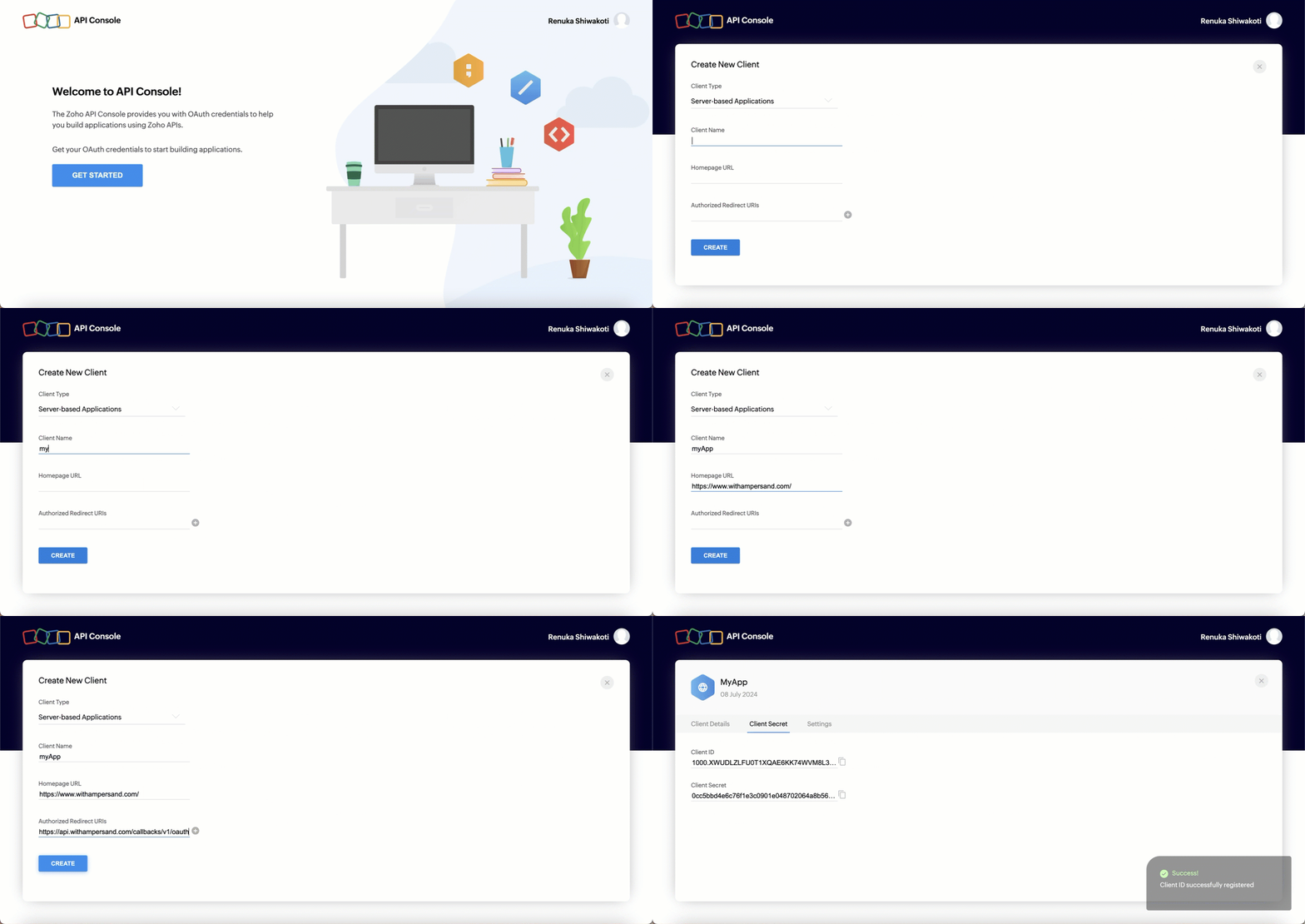
1. Log in to the [Zoho API Console Account](https://api-console.zoho.com/) using your Zoho account.
2. Click **Get Started** to create your first app. If you have already created an application, click **Add Client** to create a new app.
3. Select **Server-based Applications**.
4. Enter the following details:
   * **Client Name**: Name of the client app
   * **Homepage URL**: The home page URL of your app
   * **Authorized Redirect URIs**: The Ampersand redirect URL: `https://api.withampersand.com/callbacks/v1/oauth`
5. Click **Create**.

You'll see the details of your newly created application. Note the **Client ID** and **Client Secret** keys as they are necessary for connecting your app to Ampersand.

<img src="https://mintcdn.com/ampersand-24eb5c1a-rajatspawar-eng-4200-readd-blob-storage/HnK51FQ_CWEGqNhj/images/provider-guides/8dcf7de-zohocrm1.gif?s=c80a8a543b781dc055cb4ef5ef875ece" alt="Alt text" width="1440" height="680" data-path="images/provider-guides/8dcf7de-zohocrm1.gif" />

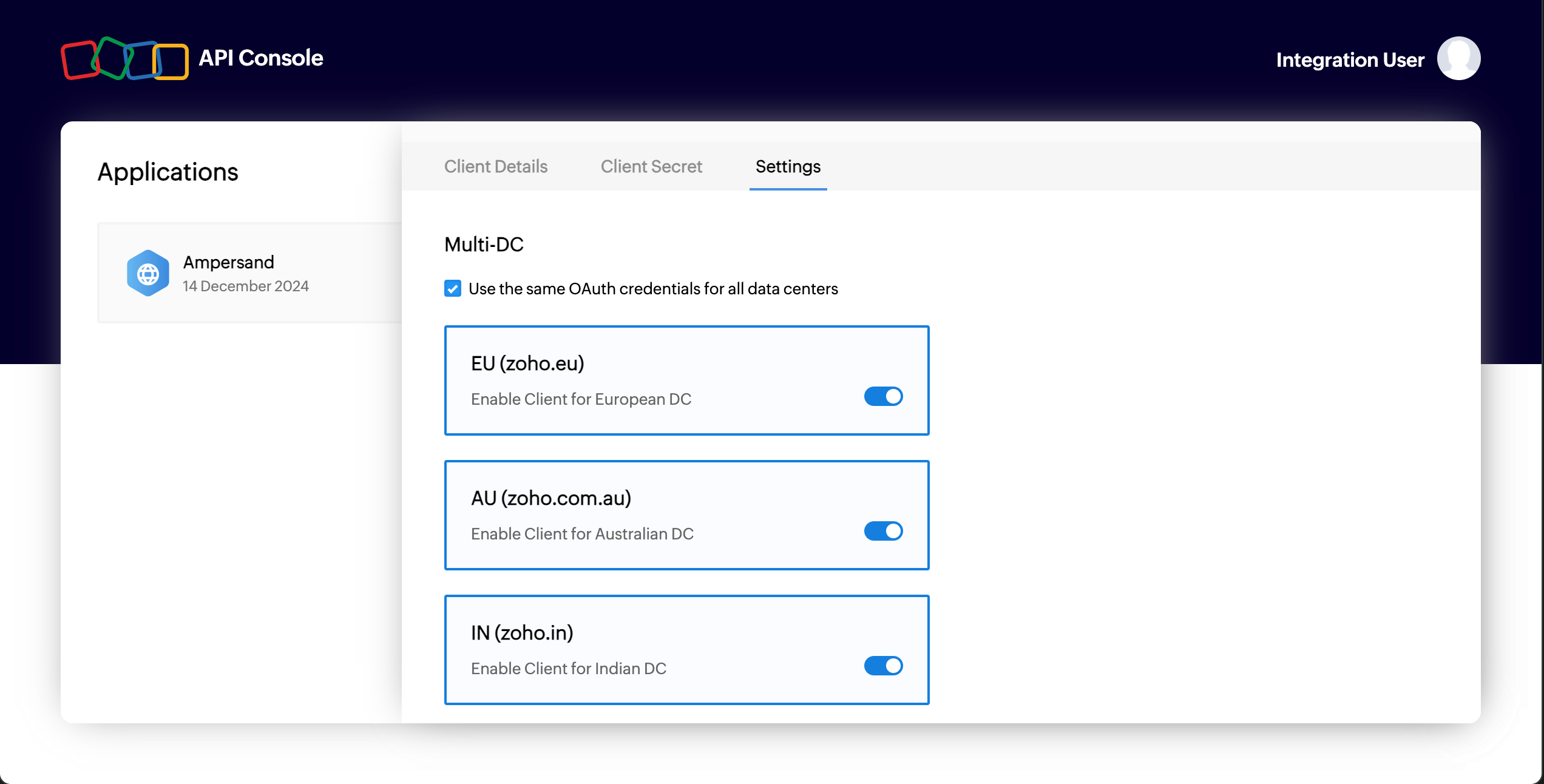
6. Select the checkbox "Use the same OAuth credentials for all data centers" in the settings tab. Also toggle all regions where you expect to have customers.
   <img src="https://mintcdn.com/ampersand-24eb5c1a-rajatspawar-eng-4200-readd-blob-storage/W3i_OqsKbzPpDYYD/images/provider-guides/zoho-region.png?fit=max&auto=format&n=W3i_OqsKbzPpDYYD&q=85&s=431bdecbce8eac3c400642c0dc695196" alt="Toggle regions" width="2544" height="1292" data-path="images/provider-guides/zoho-region.png" />

## Add Your Zoho App Info to Ampersand

1. Log in to your [Ampersand Dashboard](https://dashboard.withampersand.com).
2. Select the project where you want to create a Zoho integration.

   <img src="https://mintcdn.com/ampersand-24eb5c1a-rajatspawar-eng-4200-readd-blob-storage/prR0nYmGsccBeYqL/images/provider-guides/dd47b7a-Ampersand.png?fit=max&auto=format&n=prR0nYmGsccBeYqL&q=85&s=80a976be90706a0ba17d50338983bbd9" alt="Alt text" width="2244" height="442" data-path="images/provider-guides/dd47b7a-Ampersand.png" />
3. Select **Provider apps**.
4. Select **Zoho** from the **Provider** list.
5. Enter the previously obtained **Client ID** in the **Client ID** field and the **Client Secret** in the **Client Secret** field.
6. In the **Scopes** field, enter the list of desired scopes for your integration. We recommend the following scopes. If you want more granular scopes, please refer to the [Zoho documentation](https://www.zoho.com/accounts/protocol/oauth/scope.html) for syntax.

**Zoho CRM:**

```
ZohoCRM.modules.ALL
ZohoCRM.settings.ALL
```

In case you are using **Subscribe** action with Zoho CRM, additional scope is required

```
ZohoCRM.notifications.ALL
```

**Zoho Desk:**

```
Desk.basic.READ 
Desk.settings.ALL 
```

**Zoho Mail:**

```
ZohoMail.accounts.ALL
ZohoMail.folders.ALL
ZohoMail.tags.ALL
ZohoMail.messages.ALL
ZohoMail.tasks.ALL
ZohoMail.notes.ALL
ZohoMail.links.ALL
```

The accounts scope is always required (`ZohoMail.accounts.READ` is sufficient): Ampersand uses it after authentication to resolve your customer's Zoho Mail account ID, which account-scoped objects (`messages`, `accounts/folders`, `accounts/labels`) depend on. You can drop the scopes for object families you don't use.

7. Click **Save changes**.

## Customer Guide

The [Zoho Customer Guide](/customer-guides/zoho) can be shared with your customers to help them successfully use your integration.

## List on Zoho Marketplace

The final step, which is optional, is to list your application on the Zoho Marketplace. Follow the steps below to list your application:

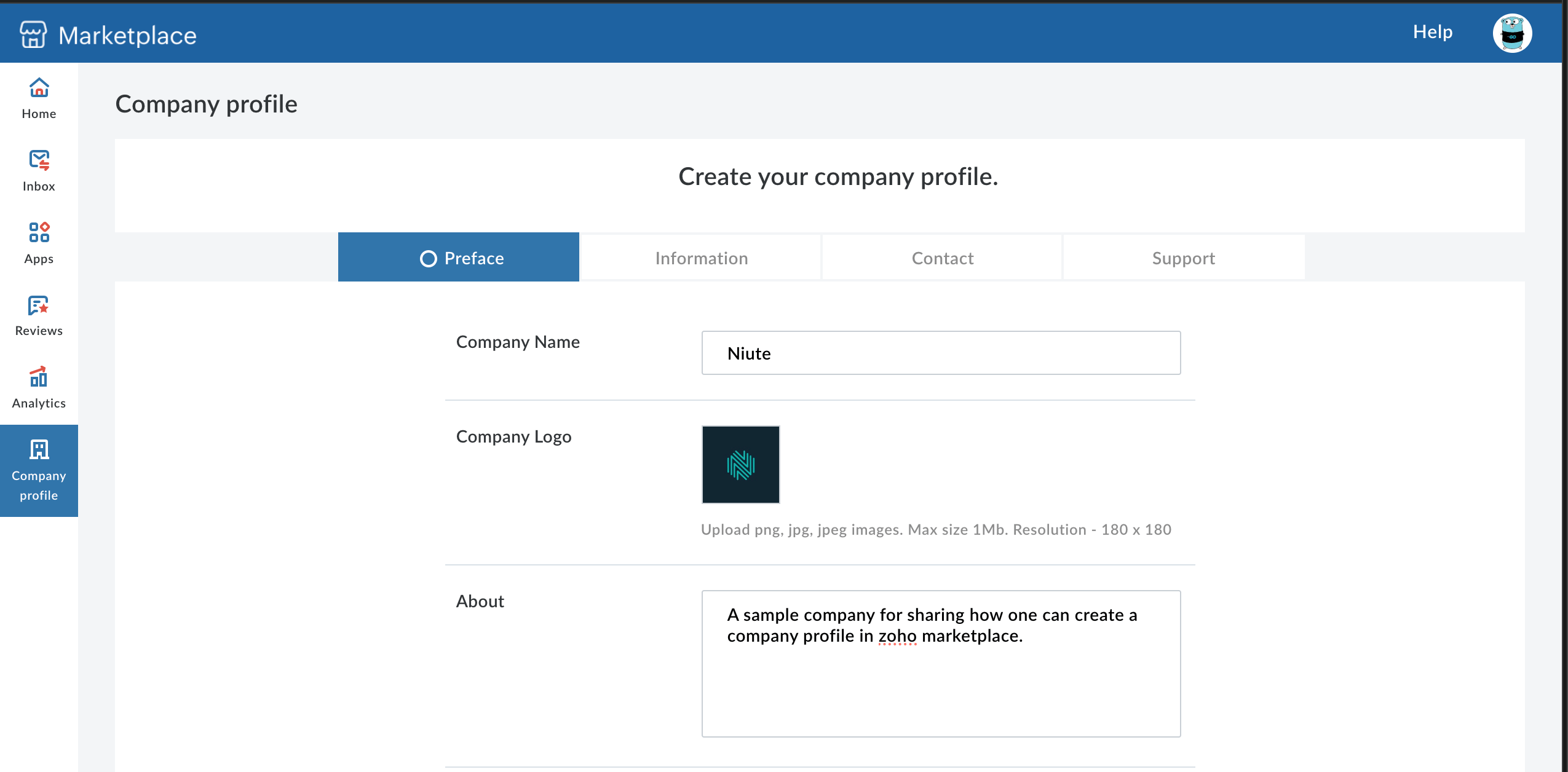
1. Sign up and create a company profile on the [Zoho Marketplace](https://marketplace.zoho.com/home).
2. Click on the profile icon on the home page and select **Partner Console**.
3. Select **Company Profile** on the left panel.
4. Provide your company details. Note that these are your own company's details, not Ampersand's.
   <img src="https://mintcdn.com/ampersand-24eb5c1a-rajatspawar-eng-4200-readd-blob-storage/W3i_OqsKbzPpDYYD/images/provider-guides/zoho-cp.png?fit=max&auto=format&n=W3i_OqsKbzPpDYYD&q=85&s=070f588b2fbb35cf0e3fe350a4f81384" alt="Zoho marketplace" width="2550" height="1256" data-path="images/provider-guides/zoho-cp.png" />
5. After successful registration, go to **Apps** on the left sidebar and click **Submit App**.
6. Complete the process by adding your app's details and submitting it.